
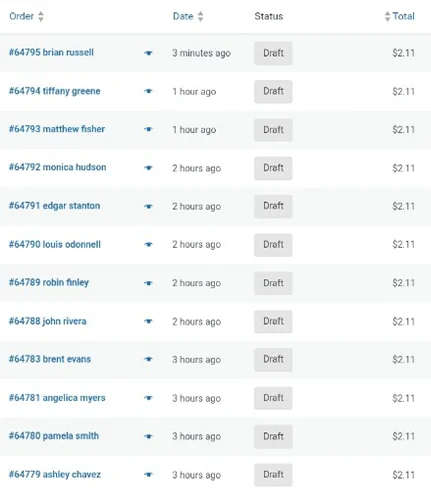
If you’re seeing hundreds of draft orders, $1–$2 test purchases, or buy-now-pay-later abuse, you’re likely dealing with automated checkout testing. These attacks are most commonly caused by card-testing bots, and they leave behind a familiar mess: hundreds or thousands of failed or draft orders, locked inventory, wasted admin time, and a checkout dashboard so noisy you can’t see what real customers are actually doing.
These bots aren’t trying to buy your products. They’re testing whether stolen payment credentials work — using the smallest, lowest-risk transaction possible before attempting larger fraud elsewhere.
Automated checkout abuse is one of the most frustrating problems WooCommerce store owners face.
Common symptoms include:
- Hundreds (or thousands) of draft or pending orders
- Fake checkouts using Buy Now, Pay Later payment methods
- Inventory locked by unpaid orders
- Admin time wasted reviewing junk activity
- No meaningful revenue gained
What makes this problem especially painful is that most advice online only solves half of it.
In this post, we’ll explain:
- How modern checkout bots actually operate
- Why common WooCommerce defenses fail to fully stop them
- The layered approach we use to harden WooCommerce sites for clients
- A critical backend endpoint most stores leave completely unprotected
How Card-Testing Bots Actually Work
Card-testing bots are not shopping.
They are automated systems designed to verify whether stolen credit card or payment credentials are still valid. To do that efficiently, they aim for maximum signal at minimum cost.
That’s why they almost always choose:
- The lowest-priced item in the catalog
- Free or in-store pickup when available
- The fastest checkout path possible
- Payment methods that allow early authorization attempts
A $1–$2 purchase attempt tells the attacker everything they need to know. If it works, the card is valuable. If it fails, they move on — often leaving behind a draft or failed order in WooCommerce.
This behavior is intentional, repeatable, and highly automated.
Why Geography Matters for US-Only WooCommerce Stores
For stores that only sell within the United States, geographic traffic patterns provide important context when diagnosing checkout abuse.
While some international browsing is normal for any public website, repeated cart and checkout activity from regions the business does not serve is a strong indicator of automation rather than genuine customer intent.
This distinction is important:
- Browsing traffic is low-risk
- Checkout and cart actions change state and consume resources
For this reason, professionally managed e-commerce sites apply additional verification to state-changing actions originating outside their sales region — while allowing normal browsing to remain unrestricted.
📊 Visitor Geography – Last 28 Days
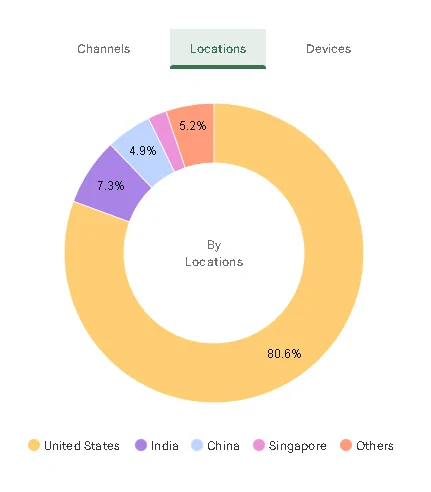
This store only sells and ships within the United States. While some international browsing is normal, repeated checkout activity from regions the business does not serve is a common indicator of automated abuse.
For this reason, professionally managed WooCommerce sites apply additional verification to cart and checkout actions originating outside the store’s sales region, while allowing normal browsing to remain unrestricted.
Why this matters:
This store only sells and ships within the United States. Approximately one in five visits originate from regions the business does not serve. While international traffic alone is not inherently malicious, out-of-market checkout attempts are a common pattern in automated card-testing and checkout abuse. Applying friction selectively to checkout actions — rather than blocking access outright — allows legitimate customers to browse freely while reducing abuse where it is most likely to occur.
The Core Misconception: Bots Don’t Use Your Website Like Humans Do
Most store owners assume bots behave like people:
- They load pages
- Click buttons
- Fill out forms
That assumption is no longer accurate.
Modern checkout bots do not browse your site at all. Instead, they interact directly with WooCommerce’s backend APIs — the same endpoints your browser uses behind the scenes for JavaScript-driven carts and block-based checkout.
This is why:
- CAPTCHA on the checkout page sometimes fails
- Rate limiting reduces frequency but doesn’t stop abuse
- Minimum order plugins limit financial impact but don’t stop order creation
To stop checkout abuse permanently, you must protect actions, not pages.
Step 1: Lock Down Known WordPress Attack Surfaces
The first layer we deploy for WooCommerce clients is edge-level WordPress hardening using a CDN/WAF such as Cloudflare.
We challenge or restrict:
/xmlrpc.php/wp-login.php
We also apply geographic rules only to administrative and authentication endpoints, reducing noise without impacting normal visitors.
This step doesn’t stop checkout abuse by itself — but it significantly reduces probing, credential-stuffing, and background attack traffic.
Step 2: Apply Business Rules That Limit Financial Damage
Before implementing deeper technical controls, we ensure checkout abuse cannot cause direct financial harm.
Typical controls include:
- Enforcing minimum order values
- Reviewing shipping methods (especially free pickup edge cases)
- Evaluating payment methods most commonly targeted by bots
These measures don’t stop automation — but they cap downside while stronger protections are deployed.
Step 3: Throttle Checkout Attempts (Helpful, Not Sufficient)
WooCommerce includes rate-limiting controls for checkout attempts, which we often enable as a temporary safeguard.
This slows bots down but does not stop them. A determined attacker will simply wait and retry.
At this stage, many stores believe the issue is resolved — only to find draft orders continuing to appear at predictable intervals.
Step 4: Protect Classic Checkout Submission Endpoints
Next, we protect the traditional checkout submission paths used by legacy WooCommerce flows:
POST /checkoutPOST ?wc-ajax=checkoutPOST /wp-admin/admin-ajax.php?action=wc_ajax_checkout
Challenging these requests at the edge prevents a large percentage of automated order creation.
For older WooCommerce setups, this may be enough.
For modern WooCommerce installs, it usually isn’t.
Step 5: The Critical Step Most Guides Miss — Store API Protection
Modern WooCommerce relies heavily on the Store API to power block-based carts and checkout.
That API lives at:
/wp-json/wc/store/
Real customers never see this URL, but their browser uses it continuously to:
- Add items to cart
- Update customer details
- Select shipping options
- Prepare checkout state
Bots target this API because it:
- Bypasses page rendering entirely
- Skips forms and UI-level checks
- Enables fast, scripted interaction
In real-world incidents we’ve handled, the remaining draft orders were created exclusively through Store API POST requests.
The Fix
We apply managed challenges at the edge for:
POST /wp-json/wc/store/cart/add-item
This single control:
- Stops bots before WooCommerce creates orders
- Adds no visible friction for real customers
- Protects all modern checkout flows, including BNPL methods
Once this rule is in place, draft orders stop entirely.
Why This Works Without Breaking Checkout
Real customers:
- Load pages normally
- Execute JavaScript
- Carry cookies and browser fingerprints
- Pass managed challenges invisibly
Bots:
- Send scripted POST requests
- Skip browsing context
- Fail behavioral verification
The result is simple:
- Humans continue to check out
- Bots never reach order creation
What This Looks Like on Professionally Managed WooCommerce Sites
On serious e-commerce deployments, this approach is standard:
- Edge protection on state-changing POST endpoints
- REST and AJAX endpoints guarded, not blocked
- Business rules layered with technical controls
- Checkout monitored at the API level, not just the UI
Most checkout abuse persists because stores only protect what they can see.
Our Standard WooCommerce Hardening Checklist
For client deployments, we standardize:
- CDN + WAF in front of WooCommerce
- XML-RPC and login protection
- Checkout POST protection (classic + modern)
- Store API POST protection
- Minimum order and shipping sanity checks
- Automatic cleanup of unpaid orders
- Ongoing monitoring of checkout endpoints
This approach scales cleanly and avoids fragile, plugin-only solutions.
Need Help Hardening Your WooCommerce Store?
If your store is dealing with:
- Draft order floods
- Checkout abuse
- Payment testing attempts
- Performance issues caused by bot traffic
ProSecure IT Solutions helps businesses deploy properly hardened WooCommerce environments using the same layered methodology outlined above.
Talk to a WooCommerce Security Specialist
No responses yet